Clairo
AI-powered assistant to help you understand medical terminology, records, and reports with clarity.
Clairo is a web app that helps people understand their medical reports with more clarity. Clairo solves this by letting you:
- Upload any medical PDF (blood work, pathology report, imaging results, etc.)
- View it in a clean and interactive reader
- Highlight any word, phrase, sentence, etc. and instantly get a medical definition and/or plain language explanation
- Chat with an AI that read your specific document and can answer questions like "Are any results something I should worry about?" or "What should I ask my doctor?", etc.
Architecture
Clairo has a dual AI architecture: the user has the freedom to choose between:
| Mode | Model | Where it runs | Trade-off |
|---|---|---|---|
| Cloud AI | Google Gemini 2.5 Flash | Server side API route | Fast, powerful, but data leaves the browser |
| Local AI | Qwen 2.5 1.5B (using WebLLM) | Entirely in the browser using WebGPU | around 1GB download, slower, but 0 data transmission |
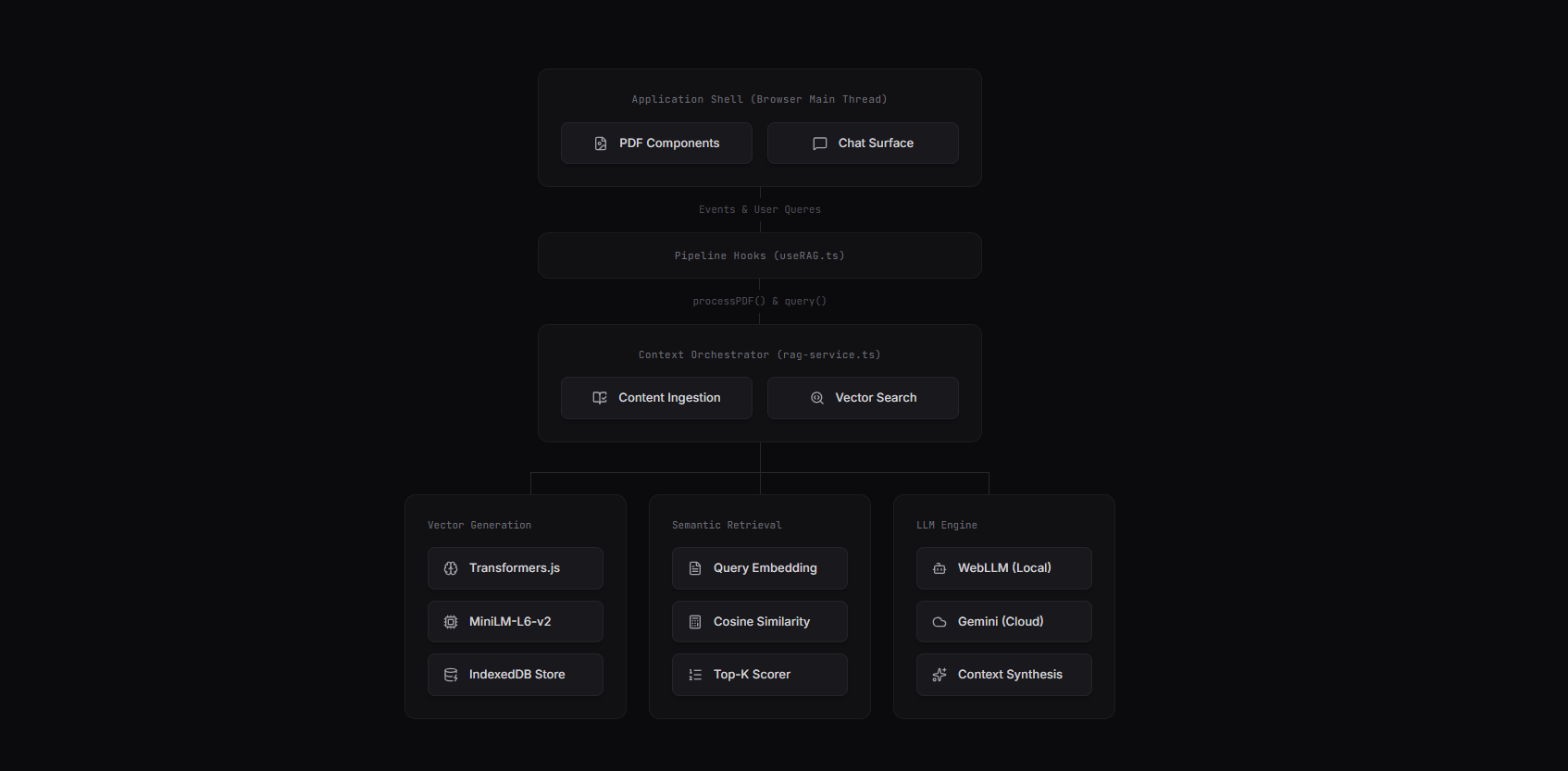
The architecture splits into 2 independent pipelines:
Ingestion Pipeline → runs when a PDF is uploaded:
PDF → extract text per page → split into around 500 char chunks → generate 384 dim embeddings → store in IndexedDB
Query Pipeline → runs on every user question:
Question → embed → search vector store for similar chunks → inject top results as context → send to LLM → stream response
Both pipelines run on client side. The only server involvement is when the user chooses cloud AI, in which case the Next.js API route proxies the request to Google's Gemini.
In-Browser RAG Pipeline
Cosine Similarity: The Main Search Algorithm
When a user asks a question, the app needs to find which chunks of the medical report are most relevant → not by keyword matching, but by the semantic meaning. "Are my cholesterol levels okay?" should match a chunk that says something like "lipid panel within reference range", or something similar.
This is done by converting both the question and every document chunk into 384 dimensional vectors, then measuring the angle between them:
The implementation:
private cosineSimilarity(a: number[], b: number[]): number {
    let dotProduct = 0;
    let magA = 0;
    let magB = 0;

    for (let i = 0; i < a.length; i++) {
        dotProduct += a[i] * b[i];  // Dot product: how much do they point the same way?
        magA += a[i] * a[i];        // Magnitude of vector A
        magB += b[i] * b[i];        // Magnitude of vector B
    }

    magA = Math.sqrt(magA);
    magB = Math.sqrt(magB);

    if (magA === 0 || magB === 0) return 0; // Guard against zero vectors

    return dotProduct / (magA * magB); // -1 (opposite) to 1 (identical meaning)
}
Then, the search method uses this implementation to rank all chunks and return the top K results above a minimum relevance threshold (the default is: 0.3):
public async search(queryEmbedding: number[], fileKey: string, topK = 5, minScore = 0.3) {
    const docs = await this.getDocumentsByFileKey(fileKey);

    const results = docs.map(doc => ({
        text: doc.text,
        pageNumber: doc.pageNumber,
        score: this.cosineSimilarity(queryEmbedding, doc.embedding)
    }));

    return results
        .filter(r => r.score >= minScore)    // Only the relevant chunks
        .sort((a, b) => b.score - a.score)   // Best matches first
        .slice(0, topK);                     // Return the top 5
}
For a single document use case (1 medical report at a time), the dataset is small enough → typically 20-80 chunks → that a brute force linear scan with cosine similarity is fast enough (<5ms). Adding a dependency (something like Pinecone) would have sensitive personal data that leaves the browser, a problem that directly contradicts the privacy promise of Clairo.
Text Chunking Strategy
PDF text is split into around 500 character chunks, always breaking on word boundaries:
const chunkSize = 500;
const words = pageText.split(/\s+/);
let currentChunk = '';

for (const word of words) {
    if (currentChunk.length + word.length + 1 > chunkSize && currentChunk.length > 0) {
        chunks.push({ text: currentChunk.trim(), pageNumber: pageNum });
        currentChunk = word;  // Start a new chunk with the current word
    } else {
        currentChunk += (currentChunk ? ' ' : '') + word;
    }
}
| Size | Pros | Cons |
|---|---|---|
| ~200 chars | Really precise search results | Loses paragraph level context; AI gets fragments |
| ~500 chars | Good balance of precision and context | Little overlap in meaning between the adjacent chunks |
| ~1000+ chars | Really good context per chunk | The embedding model only handles around 512 tokens; which dilutes the specific details, making the search results too basic (generic) and less precise |
Dual AI Backend with Streaming
The ChatService class acts as a router. Both paths use async generators for token by token streaming, so the UI shows text in real time:
public async *streamResponseRAG(question: string, fileKey: string): AsyncGenerator<string> {
    // 1. Embed the user's question
    const questionEmbedding = await embeddingService.embed(question);

    // 2. Search for the most relevant doc chunks
    const relevantChunks = await vectorStore.search(questionEmbedding, fileKey, 5, 0.3);

    if (relevantChunks.length === 0) {
        yield "I couldn't find relevant information in the document...";
        return;
    }

    // 3. Format the retrieved chunks into a context string
    const context = relevantChunks
        .map((chunk, i) => `[Excerpt ${i+1} - Page ${chunk.pageNumber}] ${chunk.text}`)
        .join('\n\n---\n\n');

    // 4. Route to local or cloud AI
    if (!this.useLocalModel) {
        yield* apiChatService.streamResponse(question, context);
    } else {
        // Run locally via WebLLM (Qwen 2.5)
        const completion = await this.engine.chat.completions.create({
            messages: [
                { role: "system", content: systemPrompt + context },
                { role: "user", content: question }
            ],
            stream: true,
            temperature: 0.7,
        });
        for await (const chunk of completion) {
            if (chunk.choices[0]?.delta?.content) yield chunk.choices[0].delta.content;
        }
    }
}
The cloud path goes through a Next.js API route that adds rate limiting (10 req/min per IP) and input validation before proxying to Google Gemini:
const rateLimitMap = new Map<string, { count: number, resetTime: number }>();
const MAX_REQUESTS_PER_WINDOW = 10;
const RATE_LIMIT_WINDOW_MS = 60_000;

if (question.length > 2000) return error(400, 'Question too long');
if (context && context.length > 50000) return error(400, 'Context too large');

// Stream from Gemini back to client
const responseStream = await ai.models.generateContentStream({
    model: 'gemini-2.5-flash',
    contents: finalPrompt,
    config: { systemInstruction, temperature: 0.7, maxOutputTokens: 2000 }
});
Interactive Tooltip System
One of my favourite UX details is the context tooltip. When a user highlights any text in the PDF viewer, a floating tooltip appears with 2 options:
- "Exact Definition" → First queries the Merriam Webster Medical Dictionary. If there's no match, it falls back to the AI for a definition.
- "Explain This" → Asks the AI for a roughly 50 word plain language explanation of the selected term/phrase(s)
Both of them include a "Simplify" option that explains the output for even a 5th grader to understand.
const handleDefineClick = async () => {
    // Try dictionary first
    const response = await fetch(
        `https://dictionaryapi.com/api/v3/references/medical/json/${selectedWord}?key=...`
    );

    if (response.ok) {
        const data = await response.json();
        if (data.length > 0 && typeof data[0] === 'object') {
            setDefinitions(data[0].shortdef.slice(0, 3));
            setSource('Merriam-Webster Medical');
            return; // Dictionary had it
        }
    }

    // Fallback: ask the AI
    const chatService = await loadChatService();
    for await (const chunk of chatService.streamResponse(aiPrompt)) {
        // ...
    }
    setSource('AI Medical Intelligence');
};
Challenges & Lessons Learned
WebGPU browser support: WebGPU is not available in Firefox or Safari. The ModelLoader component detects this and falls back to cloud only mode with a clear message.
Context window management: Medical reports can be 20+ pages. So dumping the entire text into an LLM context window would go past token limits and reduce the quality of answers and explanations. The chunking + RAG approach means only the 5 most relevant around 500-char excerpts get sent → roughly 2500 chars of targeted context instead of 50,000 characters of everything in the doc.
Rate limiting on a serverless function: The in memory Map used for rate limiting resets on cold starts, which is a known limitation of serverless. It's function for the current use cases but a production version would use Redis or Cloudflare's rate limiting.
Future Improvements
- Multi-document comparison: Let users upload multiple reports (e.g., bloodwork from different dates) and ask "How have my levels changed?"
- Overlap-aware chunking: Current chunks have strict boundaries. Sliding window chunking with for example a 20% overlap would stop losing context at chunk borders.